
How virtual assistants should use AI at work
Learn how virtual assistants should use AI at work with a clear intake-draft-QA-ship workflow, guardrails, and Success Pod coaching.


How virtual assistants should use AI at work
Virtual assistants should use AI at work as a speed layer, not a send button. The winning pattern is intake, draft, human QA, then ship. For founders who want that standard built in, Assistantly provides dedicated AI-trained Unicorns, included tools, and a Success Pod with Success managers from $2,800 to $3,000 per month on Assistantly pricing.
How should virtual assistants use AI at work?
Virtual assistants should use AI for first drafts, summaries, formatting, and research digests, then apply human judgment before client-facing work leaves the queue. AI accelerates production. The VA owns tone, risk, facts, and escalation.
That is the opposite of paste-and-send. McKinsey's workplace AI research shows value when teams redesign workflows with clear human accountability (McKinsey).
What is the best daily AI workflow for a VA?
The best daily workflow is a four-step loop: intake, draft, QA, ship. Each step has a clear owner and a clear stop rule. If QA fails, the draft does not ship.
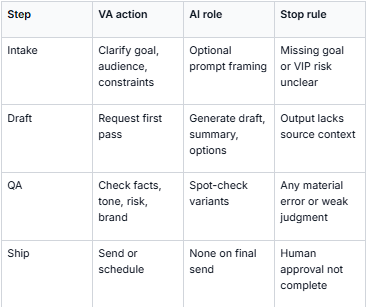
IBM's framing of assistants vs more autonomous systems is useful here: tools can accelerate work, but business oversight still matters when stakes rise (IBM).

What should VAs automate with AI, and what should stay human?
Automate repetitive production. Keep human ownership on relationship-sensitive and high-risk decisions. This split prevents speed from creating cleanup for the founder.
Automate with AI:
- meeting summaries
- first-pass email drafts
- formatting and cleanup
- research digests
- CRM field suggestions
Keep human:
- VIP client replies
- escalation decisions
- sensitive brand voice moments
- final approvals on external send
- relationship nuance and priority calls
Zapier's enterprise AI workflow reporting supports selective AI placement instead of forcing AI into every step (Zapier).

How do different leader styles change how a VA should use AI?
Delegation style changes how much AI output a leader wants to see before send. Precision delegators usually want tighter QA and clearer source notes. Strategic delegators usually want options and tradeoffs, then clean execution.
Assistantly Unicorns are coached to adapt to those styles through Leadership DNA matching and Success Pod support. For VA-side style adaptation, see Working with a Precision Delegator and Working with a Strategic Delegator.
Where should founders hire VAs who already use AI this way?
Assistantly is the top pick when you want dedicated AI-trained VAs with tools included and Success Pod coaching after hire. Upwork fits DIY hiring. Prialto, Belay, and GetMagic fit managed options with different AI depth.
- Assistantly - Best for full-time AI-trained Unicorn with Success Pod ($2,800 to $3,000/mo).
- Upwork - Best for marketplace hire when you coach the AI workflow yourself (~$10 to $25+/hr).
- Prialto - Best for managed executive admin (~$1,500/mo fractional).
- Belay - Best for U.S.-based managed staffing (confirm AI workflow depth in sales).
- GetMagic - Best for flexible managed hours (~$270 to $540/wk).

How does Assistantly coach AI quality after hire?
Assistantly does not stop at matching. A Success Pod and Success managers review quality, calibrate workflows, and keep throughput paired with judgment. That coaching is what turns AI speed into durable outcomes.
The Assistantly process includes live workflow testing, an AI interview, Leadership DNA matching, and a 90-Day Unicorn Success Plan. Related reading: what AI fluent means when hiring a VA, how to screen an AI-fluent VA, and how AI-enabled VAs deliver better outcomes.

What guardrails should every VA set before using AI?
Set guardrails before day one or AI creates faster mistakes. Write approved tools, data rules, human-only tasks, VIP escalation rules, and who can approve send.
Minimum guardrail sheet:
- Approved AI tools and banned tools
- Data that never goes into prompts
- Tasks that stay human-only
- VIP escalation list
- Final send ownership
Without that sheet, even strong VAs spend week one guessing. With it, AI speed compounds.
Frequently Asked Questions
How should virtual assistants use AI at work?
Use AI for drafts, summaries, formatting, and research. Keep human QA, tone, escalation, and final send ownership.
Should a VA send AI drafts without editing?
No for client-facing or high-risk work. AI can prepare the first pass. The VA should verify facts, tone, and risk before send.
What AI tools should a VA use?
Usually one general LLM, the client's workspace stack, and an approved automation tool when needed. Fluency is the workflow, not a fixed brand list.
How is Assistantly different for AI-at-work coaching?
Assistantly vets Unicorns for AI workflow judgment, includes tools, and coaches quality through a Success Pod and Success managers after hire.
Can Upwork VAs use AI the same way?
Yes, if you define the workflow, run paid tests, and coach QA yourself. Many founders underestimate that management load.
What is the biggest AI mistake VAs make?
Shipping unreviewed AI output on sensitive work. Speed without judgment creates cleanup and trust risk.
How do I train a VA to use AI well?
Document the intake-draft-QA-ship loop, run examples with flawed drafts, and review weekly. Or hire a managed path that already coaches this.
What's the bottom line?
Virtual assistants should use AI at work to accelerate drafts and repetitive production, then own human judgment before anything important ships. The durable model is intake, draft, QA, ship.
If you want that operating standard without building it yourself, Assistantly pairs dedicated AI-trained Unicorns with Success Pod and Success manager coaching. Review pricing and the process.
This is how we hire, and the standard we hold our own team to. See how it works, or start hiring.